What the relay sees when it forwards your chat

No account, no phone number, no email. Your devices connect to each other directly when they can. When they cannot, a group member or a relay forwards the encrypted traffic, and this is all it learns.

What your group sees What the relay sees when it has to forward for you
juniper8:41 PM
Movie night at mine on Saturday?👍 4🎉 2
20:41:07203.0.113.8 to 198.51.100.24432 B
atlas8:42 PM
I'll bring the projector.❤️ 2
20:42:13198.51.100.24 to 203.0.113.8432 B
ember8:42 PM
Only if we skip the three hour one this time.😂 3
20:42:51203.0.113.8 to 198.51.100.24432 B
juniper8:44 PM
Saturday plan: doors at 6:30, first film at 7. Atlas brings the projector and the cables, Ember brings snacks, I'll do the playlist for the break. Park on the street, not the driveway, my neighbour is back from holiday and has opinions about it. If it rains we move everything to the living room and skip the garden screen.👍 5
20:44:36198.51.100.24 to 203.0.113.81,200 B

The conversation is staged. Names, ghosts, reactions, typing and read receipts travel between your devices. Presence, typing and read receipts start on, and each has a switch.

The addresses are from a documentation range. Each frame is padded to a fixed size class when both ends run a build that reads padding, shown here before QUIC adds its own header. Reactions, typing signals and read receipts are frames of the same classes. The relay sees no names, no text and no group.

No account, no phone number, no ID

A person on Whisper is a ghost: a key pair made on the device from 24 recovery words. The ghost id is a hash of the public key, and the ghost you see is drawn from that id. Nothing is registered anywhere.

Meet the ghost for an id

random id
verification code0000-0000-0000-0000-0000-0000-00

A staged example. The same text always draws the same ghost, and the ghost is drawn by the app's own code. The code above has the app's format, 26 digits in groups of four, with made-up digits: the real one comes from the secret two people share, and they compare it to verify each other.
What other chat apps ask for

Proving who you are
Some platforms ask for a face scan or a government ID to unlock features1
Whisper asks for none of it.
Behavioural signals
Some predict a user's age group from tenure, servers joined and activity2
There is no account to build that profile on.
A vendor's breach
About 70,000 government ID photos leaked from one support vendor3
No ID is collected, so none can leak.

The sources are on the sources page. A relay still sees the IP address your device connects from, and your group sees your ghost's name.

The life of one message

Follow "Hey, same hike Saturday?" from Alex's keyboard to Maya's screen in a DM. Alex's and Maya's devices do the encrypting and decrypting. When they have no direct path, a group member or a relay forwards the connection and sees only ciphertext. The values below are illustrative.

1
Alex's device

Compose

plaintext
Alex10:40 AM
Hey, same hike Saturday?

The message is plaintext only on the devices that write and read it.

2
Alex's device

Pad and encrypt

ciphertext
keymk
nonce00
tagverified

The plaintext is padded to a fixed size first: 256 B, 1 KiB, 4 KiB, 16 KiB or 64 KiB for a group, with 64 B and 128 B added for a DM. A DM is sealed with ChaCha20-Poly1305 under a key from the Double Ratchet. A group message is sealed by MLS with AES-128-GCM.

3
Only when needed

Forward

opaque
Alex's deviceorigin
forwardera group member or the relay
ciphertext only
Maya's devicedestination

When two devices can connect directly, this step is skipped. Otherwise one forwarder carries the ciphertext. It sees both IP addresses, the volume and the timing.

4
Maya's device

Decrypt

verified
Alex10:40 AM
Hey, same hike Saturday?

Maya's device advances its ratchet, decrypts, and deletes the message key. That key opens nothing else.

The relay stores no messages and no accounts. What it does keep in memory, and for how long, is further down.

Encrypt a message in your browser

Every keystroke runs a real AES-256-GCM encryption in this tab with your browser's WebCrypto. It demonstrates authenticated encryption and is not Whisper's own code. In the app, groups use MLS with AES-128-GCM, and DMs use a Noise handshake and then a Double Ratchet with ChaCha20-Poly1305. A fresh nonce is drawn on every render, so the same text gives a different ciphertext each time. The key is discarded when you close the tab.

encryption-playgroundruns in this tab

Plaintext never leaves this tab

plaintext: 24 chars, 24 B ciphertext: 24 B + 16 B tag
key idk_8a3f nonce- tag-

Ciphertext what a network would see

The same message, five ciphertexts
Tamper test: use the buttons on the left
ok untouched gives decrypts cleanly

Every destination the app contacts

Whisper contacts its relays and the people you talk to. A short list of other destinations opens only when something you did calls for it. Switch each one below to see when it applies.

egress allowlistfrom the app's own list

    The list follows the app's own allowlist, scripts/egress/allowlist.toml, plus the same-network beacon, which the test network cannot carry. A script runs the real app in an isolated network on Linux and fails when it contacts anything not on the allowlist. That run uses a development build, so the release build's built-in relays and the update install are not part of it. The operator's log shipper exists only in an operator build, not in the one people download.

    How a DM key changes after every message

    A DM starts with a Noise handshake, then runs a Double Ratchet. After every message, both sides derive a new message key and delete the old one. If a device is compromised today, the keys for earlier messages are already gone. This is an illustration of the mechanism, not the app's code.

    ratchet-playgroundruns in this tab
    Alex
    Sending chainCKs_1
    Network wire0 frames
    Maya
    Receiving chainCKr_1
    Forward secrecy

    Break into Alex's phone today and yesterday's messages stay closed. Their keys are gone.

    Post-compromise security

    The next DH step starts a new chain from a secret the attacker never saw.

    Out-of-order messages

    The ratchet holds at most 1,000 keys for skipped messages, for at most 7 days, so a message that arrives late still opens.

    Groups do the same by epoch. Each membership change moves the group to new keys, members refresh their own keys, and the keys of old epochs are kept only for a bounded time (the last two).

    How sizes are padded

    Type a message. Before it is encrypted, its plaintext is padded up to a fixed bucket. The encrypted frame then travels in a size class of its own, so what an observer sees is one of a few sizes, not your message's length. A frame is padded only toward a device whose build reads padding, and never over a Bluetooth link.

    paddingsizes from the app's tables
    Your text
    0 B
    Plaintext bucket
    256 B
    Frame size class
    432 B

    Not padded

    • Voice packets: one size per profile, so volume and timing show when someone talks.
    • Messages to and from a relay: relay session padding is not sent yet.

    What your ISP sees

    Your ISP and every hop between you and a friend's device see IP addresses, UDP ports, timing and volume, and they can tell the traffic is Whisper: the protocol id whisper/<rev> is readable in the QUIC handshake. They cannot read the content. Send some traffic and watch an observer try to make sense of it.

    wire tapsimulated traffic, nothing is sent

    Send trafficpad, encrypt, send

    Sent
    0
    Padded to
    fixed classes
    Payload
    unreadable

    On the wirewhat the tap receives

    ISP snifferfour attacks, running live

    DPIdeep-packet inspection
    SIZElength-histogram analysis
    TIMINGinter-arrival cadence
    PROTOCOLIDS rule matcher
    What the ISP still sees
    • IP addressesSource and destination addresses and port numbers. Whisper does not hide them without a separate transport such as Tor or a VPN.
    • TransportPeers talk over one UDP socket with QUIC and TLS 1.3. A relay can also be reached over TCP with TLS 1.3 and no server name. The transport is visible and the payload is not.
    • Volume and timingPadding hides the exact length of a message. Voice packets and the messages to a relay are not padded. An observer can still see that encrypted traffic flows, when, and roughly how much.

    How two devices connect

    A chat that runs through a hub sends every byte through its operator's servers. Whisper tries three steps in order: a direct QUIC connection, with hole punching arranged through the relay; then forwarding through another member of the same group; then forwarding through the relay. A direct attempt gets 3 seconds to begin and 3 more to complete, each forwarding step 8. A forwarded link retries direct every 60 seconds. "Never relay my connections" turns both kinds of forwarding off, and direct connections still work.

    Hub design

    A chat run through its operator's servers

    SERVER
    • Every message passes through the operator's servers.
    • An outage at the hub stops every conversation.
    • The operator holds the accounts.
    Whisper

    Devices connect to each other

    • The relay helps devices find each other. It keeps no accounts and no messages.
    • A forwarder sees both IP addresses, the volume and the timing, and only ciphertext.
    • Up to 12 online members, a group is a full mesh. A larger group uses a ring with chords, about log2(n) hops across.

    Connection ladder

    • Ask the relay for the peer's addresses
    • Punch a direct path
    • Direct QUIC handshake
    • Fall back: a group member forwards
    • Fall back: the relay forwards

    A staged run. Each run picks one outcome, and a step that is not reached reads "not needed". If every step fails the peer is unreachable, and the app says so.

    What the relay is for

    A relay is a rendezvous and a last resort. It helps two devices find each other, helps them through NATs, and forwards only when nothing else works. It has no user database and no mailbox. Whisper does not use UPnP, STUN, mDNS or a DHT, so a device off your own network is found through a relay.

    Same-network links with no relay

    Two devices on one network can find each other with no relay and no internet. Each sends a sealed 988-byte beacon to its network's broadcast address. A device that shares a contact or a group with the sender can open it, and the two then open the usual pinned QUIC connection. It is on in the Windows, macOS, Linux and Android builds. On Android it has run on an emulator only, not yet between a phone and a computer. A router between two devices does not pass the beacon, and a network that keeps its clients apart blocks it. It is not on iPhone or iPad yet.

    same networkstaged, nothing is sent
    Juniper's laptopshares a group with the phone
    idle
    Atlas's phoneshares a group with the laptop

      Only people who already share a secret with you are found: a DM contact, or a member of a group in common. The link is IPv4 and stays on one network segment, so a router in between does not pass the beacon, and a network that isolates its clients blocks it.

      What a relay holds in memory, and for how long

      A relay has no database. It holds a few things in memory, and each one expires. Pick a speed and watch them go. Starting a code or listing a group adds an entry.

      relay memorysimulated clock

        What it never holds

        Message contents, ghost ids and keys, the words of a spoken code, and which scope a token belongs to. A group that is not listed has no name or id on the relay. A listed group's name, id, member range and link are public, along with the address that listed it.

        A restart empties the relay's memory. One exception: an operator can opt in to a kernel drop list for abusive sources, which survives a restart until its entries time out.

        Files in encrypted 256 KiB segments

        A file is split into encrypted segments of 256 KiB, up to 2 GiB. Any member who holds the file can serve segments, and up to four serve one download at once. When a segment has to travel over a forwarded path, the serving device writes at 85% of that path's 512 kbit/s grant, so QUIC sees no loss.

        segmentsstaged, nothing is sent

          The times are arithmetic from the constants, 85% of 512 kbit/s per forwarded path, not a measurement. A direct path has no such cap and runs at the speed of the two networks.

          One ghost on several devices

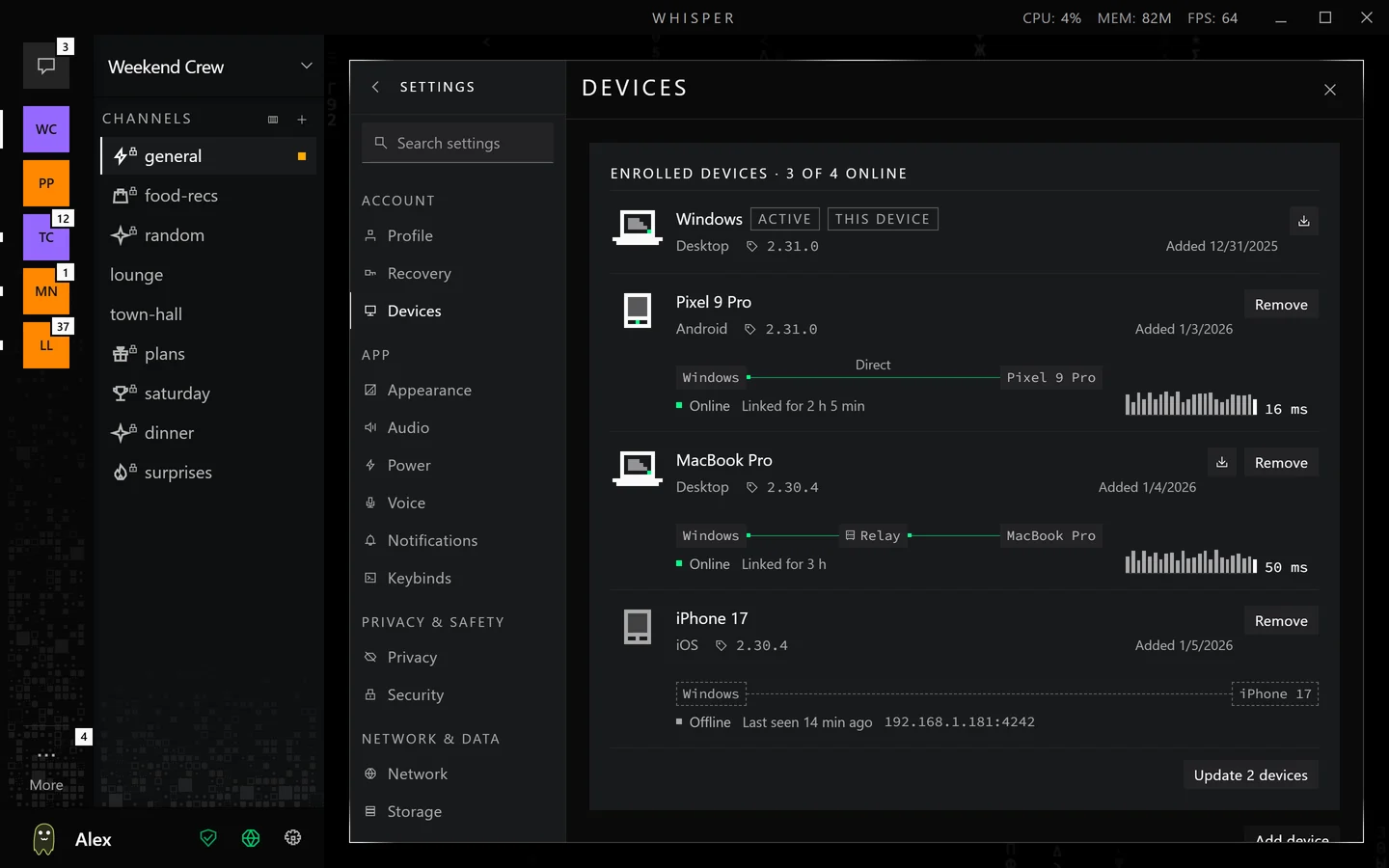
          You can run your ghost on several of your own devices. Your groups and contacts see one member. One device at a time is your main device and talks to groups and contacts. A device that is not the main one shows everything synced so far and sends through the main device while the two are linked.

          devicesstaged, nothing is sent

          What your group sees

          juniper1 member
          Pick a device and send a message from it.

          Nothing takes over on its own. Taking over from the main device is a separate action meant for a lost or broken device.

          Settings, Devices
          Settings, Devices, in the app, with sample devices. Each linked device shows whether the link is direct or through a relay.

          Voice: encrypted frames in a mesh of up to 8

          Voice is captured, encoded with Opus in 20 ms frames at 48 kHz, and encrypted on your device. A call is a full mesh of at most 8 people, and each sender sends its own frame to each other person as a QUIC datagram on the connection they already have. No media server mixes the audio. When two people have no direct path, their frames ride the same forwarded connection as their messages, still as ciphertext.

          weekend-crew voiceeight made-up people
          weekend-crew
          4 speaking, full mesh
          talkers
          room total1.3Mbps
          you up224kbps down92kbps

          Each unmuted speaker sends its encoded frames to every other person over the connection it already has.

          Rates are the encoder targets in the app. The room total is the speakers' rates times the 7 other people, as a codec figure.

          Same trust as messages

          A DM call derives its key from a secret sent in one ratchet message. A group call derives it from the group's MLS state. Every packet is sealed with AES-128-GCM under a key for that sender, with a fresh salt for each session and a 64-packet replay window.

          Each person picks a profile

          The profile sets the codec rate and channels for what you send.

          ProfileChannelsBitrateBandwidth
          Musicstereo128 kbit/sfullband
          Highstereo64 kbit/sfullband
          Mediummono32 kbit/sfullband
          Lowmono16 kbit/swideband

          Voice has no echo cancellation or noise suppression yet. The app tells you to use headphones.

          How the public directory rejects a fake listing

          A manager can list a public group on the relays their devices reach. A relay cannot see inside a group, so it cannot tell a member from a stranger: it checks only that a listing is well formed and signed by its own listing key. The real check happens on the device that joins, against the preview a member sends.

          directorystaged, nothing is sent
          Movie night8 to 15 members, online
          Movie night8 to 15 members, online, listed by a stranger with the real group's public link

            Listing is off by default and exists only for groups in Public mode. A listing stays for 3 days after a relay last received it. The Google Play build has no directory.

            The vault on your device

            Everything the app keeps is in one folder on your device: a redb database file, and beside it the files you sent and received, encrypted in chunks. Every value in the database is sealed with XChaCha20-Poly1305. The key that opens it comes from your PIN or password, run through Argon2id and mixed with a secret held by the operating system.

            Wrong guesses

            1f3a 9e b2rejected
            7c02 11 44rejected
            aa9d 8f 0crejected
            Guesses shown (animation)1,284
            Key derivationArgon2id, 64 MiB, 3 passes, 4 lanes
            CipherXChaCha20-Poly1305

            The guess counter is an animation, not a measurement of any attack.

            What protects the key

            Each guess at the PIN or password costs 64 MiB of memory and three passes of Argon2id. The result is mixed with a device secret by HKDF and wraps a random data key, so changing a PIN rewraps one record. The device secret is held by Windows DPAPI, or by the operating system's keyring elsewhere when there is one. On Android the device secret comes from a key in the phone's Keystore, starting with the release after 2.9.0, so a copy of the vault file without the phone cannot be guessed open. On an iPhone the device secret is a keychain item that never leaves the phone and is in no backup, starting with the builds after November 19, 2026; earlier iPhone builds bind nothing. A phone accepts a 4-digit PIN. On a computer with no keyring the PIN rule tightens to 8 or more characters, or 6 or more digits.

            The search index lives in memory only after you unlock. Deleting a message removes its row, and old pages hold only ciphertext until the file is compacted, so the app promises no erasure: flash storage can keep old copies. Panic Wipe, in the Danger Zone of Settings, deletes the vault.

            The app writes only warnings and errors to a 1 MiB rotating log. It holds no message text, keys, invite links, spoken codes or network addresses.

            How a device treats a peer that sends bad data

            A device scores a peer only for a signature that fails to verify, 50 points each. At 100 points the peer is cooled off for 10 minutes. Each repeat within a day doubles the window, up to 6 hours, and scores fall 5 points a minute. Rate-limit overruns are never scored, and standings are held in memory only, so a restart forgives everything.

            Recent peer events

            Made-up peers, one step is about a minute

            A staged run that is faster than real time. A window longer than 40 minutes is shortened so the demo keeps moving.

            What the Security page checks

            The Security page checks relays, the clock, the version, relaying, contacts and groups. It reads the app's own state and gives no score. It does not scan the device for malware.

            SECURITY
            All clear
            Nothing below needs your attention. Whisper does not scan this device for malware.
            RelaysCLEAR
            Connected to 2 of 2 relays.
            ClockCLEAR
            This device's clock agrees with the relays.
            VersionCLEAR
            No update is required.
            RelayingNOTE
            Relays may forward your connections when no direct path exists.
            ContactsCLEAR
            You verified all 3 contacts.
            GroupsCLEAR
            Your group is confirmed.
            Screen capture protection
            Prevents screen recording and screenshot tools from capturing this window

            Connections

            • Relays: how many are set up and connected, and whether any turned this device away or could not be trusted
            • Clock: a relay's time was rejected, or no relay has reported the time yet

            Version

            • Relays reject this version. Update Whisper to reconnect.
            • The release information on this device has expired. Check for an update.

            Relaying

            • Relays may forward your connections when no direct path exists.
            • "Never relay me" is on, so your connections go direct or not at all.

            Contacts and groups

            • Contacts: compare codes with a contact to verify them.
            • Groups: confirmed by the member who invited you. Unconfirmed groups work meanwhile.

            How an update reaches your device

            The app learns of a release from a relay or a peer, as a manifest signed with Whisper's release key. It makes no web request to find out. The installer is downloaded from the release host only after you click, and it installs only if its size and BLAKE3 hash match the signed manifest.

            Signed release manifestsigned
            version2.13.0
            channelbeta
            seq4620
            windows16.9 MB, blake3 5073 137a 2bf9 588a
            android75.5 MB, blake3 ebb2 7c7c 3965 c11b
            macos23.5 MB, blake3 c44f 1b28 1126 6270
            linux30.0 MB, blake3 1513 3221 fcaf 77a8
            Release metadata
            issued2026-11-21 06:27 UTC
            minimum safe version2.4.0
            Installer downloadwaiting for a manifest
            a relay passes on the signed manifesta peer can too
            the release host serves the installer over HTTPSonly after your click
            Learn of the release from a relay or a peer
            Verify the signature
            Wait for your click
            Download the installer over HTTPS
            Match BLAKE3 hash and size, then launch
            Where news comes fromRelays keep the newest manifest and push it to sessions. Clients pass newer manifests to peers and relays. Relays never store installers.
            ConsentNothing installs until you choose to.
            A build that is too oldA client below the minimum safe version loses relay access and keeps its local data and direct connections until it updates.

            Agents: run Whisper with no window

            The installed app can run headless, with no window, and talk JSON lines on its standard input and output. An agent is a member like any other: its own vault and identity, joined to a group by an invite or reached by a DM request, with the same encryption. Nothing about it is a bot account on a server, and Whisper ships no model and no hosted bots. An agent is a program a person runs.

            headless agentstaged, the JSON is elided

            It ships in the same download as the app, on Windows, macOS and the Linux deb. --listen keeps a node running and only the same operating-system user can reach it. A member whose role is named Agent shows as a robot instead of a ghost, in chat and in the member list. Its group messages raise no badge and no notification unless they mention or reply to you, or you turned Quiet agents off for that group. Headless has no audio, so an agent cannot speak in a voice room.

            The group's owner decides whose messages set its agents to work: the owner alone, the owner and chosen members, or everyone. The owner also decides when: on every message, on mentions and replies, or never. A channel follows the group's rule or has its own. With no rule set, only the owner's messages count. The agent's node raises agentTriggered only for a channel message the rule allows, with the reason message, mention or reply. In this example the owner chose mentions from everyone. The rule binds the agent's own node, so a program that reads messageUpserted instead does not see it.

            What Whisper does not do

            These limits are part of the design and the current build.

            • A relay sees addresses and timing. It learns the IP address and port a device connects from, the time, the release version, and which addresses look up the same token. A forwarder sees both addresses and the volume and timing of what it forwards. Whisper does not hide IP addresses.
            • You get no history from before you joined. A new member does not receive earlier messages.
            • Voice has no echo cancellation or noise suppression yet. The app tells you to use headphones.
            • Voice packets and messages to a relay are not padded. Padding covers peer stream frames.
            • Deleting is a request. A delete removes the message from this device and asks peers to delete it. Nothing stronger is promised.
            • Off your own network, a relay is how people find each other. Whisper does not use UPnP, STUN, mDNS or a DHT. Same-network links are IPv4, one network segment, and not on iPhone or iPad yet.
            • No post-quantum cryptography in the builds you download. Keys and signatures use X25519 and Ed25519. A hybrid ML-KEM key exchange for peer connections is in the code and switched off.
            • The source code is private. Public releases are installers and signed manifests.
            • The app is in English and Spanish only.
            • The Google Play build has no public directory. Every other build keeps it.