Download Whisper

Whisper is in beta. Version 2.13.0 is the current build for every download below.

Windows

Installer for 64-bit x86

Download for Windows Whisper-Beta-Setup-2.13.0.exe
Version
2.13.0
Size
17.7 MB 17,728,456 bytes
SHA-256
4680774906568b45804d36a4614044df88f85357664a84fcb5f4b2fb868ebd14
BLAKE3
5073137a2bf9588ae05ad709a1cb9819ebb2d6cb2fba417118bd1e79093e53dc

The installer expects Microsoft WebView2 to be installed already.

macOS

App for Apple silicon, in a zip

Download for macOS Whisper-Beta-2.13.0-macos-arm64.zip
Version
2.13.0
Size
24.6 MB 24,589,744 bytes
SHA-256
4a31e742276bbb48c4ea1030efe1598e8aff2001585e06b9ff054bb773dbd417
BLAKE3
c44f1b28112662701c22e53fc9638f8afd74d0b329448de5410cc82fa7e5fca5

Built for Apple silicon only, not for Intel Macs.

Android

APK for arm64, installed by hand

Download for Android Whisper-Beta-2.13.0-arm64.apk
Version
2.13.0
Size
79.2 MB 79,175,899 bytes
SHA-256
63937e19936d32f54aa6d970cddd297384db10fb40a4f14e69380ca9ff1505ff
BLAKE3
ebb27c7c3965c11b5eccaba6c2b58189e8b0693ef8935b7176d159ebe140e8c6

Needs Android 8.0 or later. It does not come from a store.

Linux

Debian package for 64-bit x86

Download for Linux Whisper-Beta-2.13.0-amd64.deb
Version
2.13.0
Size
31.5 MB 31,451,606 bytes
SHA-256
38c7e3431535a74c00adaa5af373dd0c5e193920fd76b512a77319bdd5675ed9
BLAKE3
15133221fcaf77a88badd5b1a000c9f37b38348c66718cdd3dbf48b489208fa7

Needs libwebkit2gtk-4.1-0 and libgtk-3-0. Installed by hand.

Linux server

The whisper-node server binary, in a tarball, with no GUI libraries

x86_64

File
whisper-node-2.13.0-linux-x86_64.tar.gz
Size
18.0 MB 17,964,341 bytes
SHA-256
17c7b7d1402a234530fb7cb76c878ef4af5d75d3067e36e4033faecea9ba3409
BLAKE3
abca1f313916ad06bc76e5f6eebe4c9f9a63603c0aab7a8e3d3779a14460acc5

aarch64

File
whisper-node-2.13.0-linux-aarch64.tar.gz
Size
17.5 MB 17,509,808 bytes
SHA-256
08d3f119071a77c9b59cdb0d10f14edae545085d4dc2f7381f45d8f2162c1ef4
BLAKE3
8795d87267be8b240d9fa24b16f855a83f34401db7c4f72c6587ba452ccf6b99

It runs with no window: --listen for a daemon, --mcp for MCP mode, and the whisper-node link commands. How it works is on the Tech page.

Check a download before you run it

Run the command for your system on the file you downloaded. The output must equal the SHA-256 shown above for that file. Capital and small letters count the same.

  • Windows, PowerShell
    (Get-FileHash .\Whisper-Beta-Setup-2.13.0.exe -Algorithm SHA256).Hash
  • macOS, Terminal
    shasum -a 256 Whisper-Beta-2.13.0-macos-arm64.zip
  • Linux, shell
    sha256sum Whisper-Beta-2.13.0-amd64.deb
  • Linux server x86_64, shell
    sha256sum whisper-node-2.13.0-linux-x86_64.tar.gz
  • Linux server aarch64, shell
    sha256sum whisper-node-2.13.0-linux-aarch64.tar.gz

For the Android file, run the macOS or Linux command on a computer before you copy the APK to the phone.

As a second check, b3sum from the BLAKE3 project prints the BLAKE3 value in the same way: b3sum followed by the file name.

What first run asks for

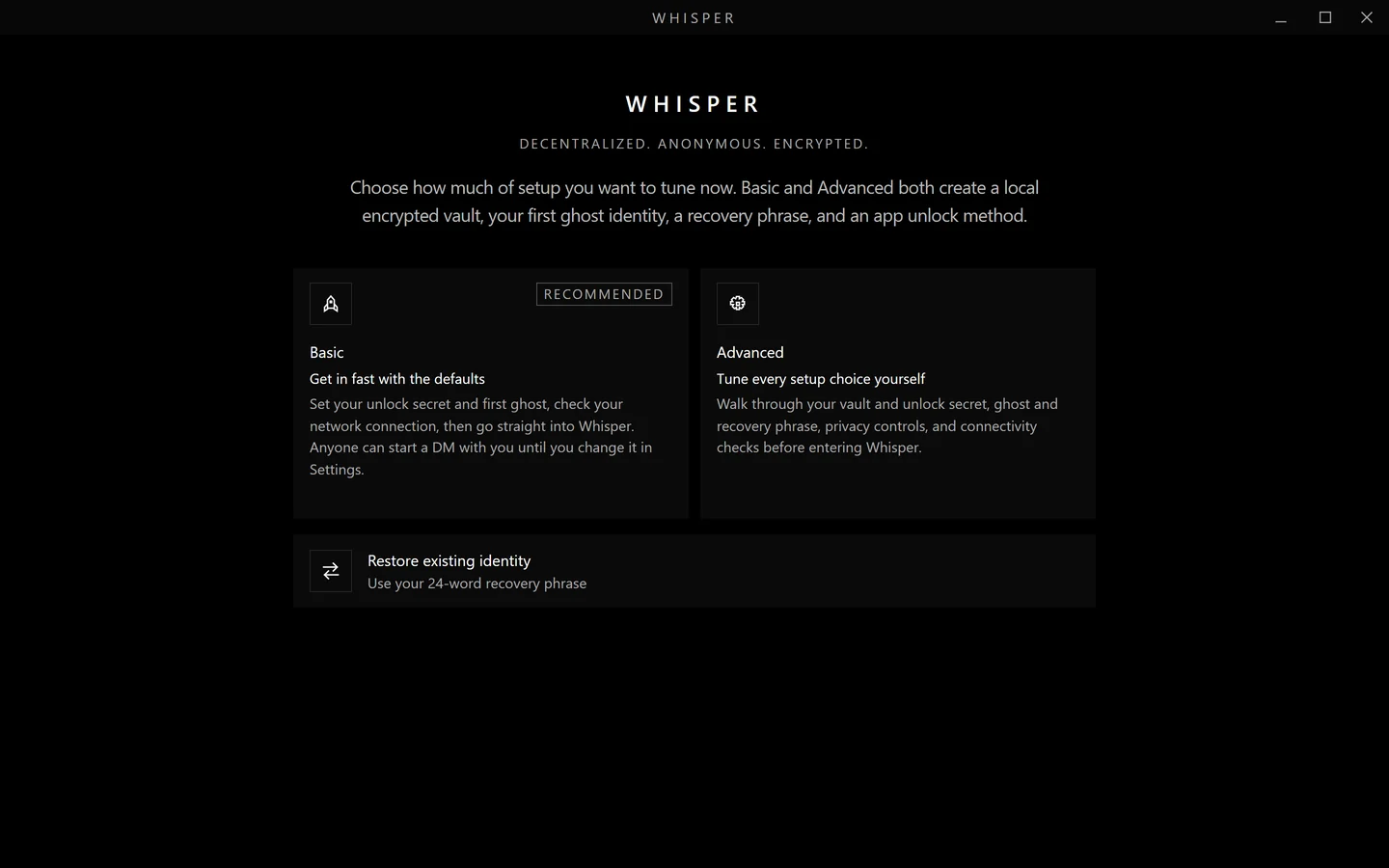
  1. Basic or Advanced setup. Basic uses the defaults: presence, typing indicators and read receipts are on, each with its own switch, and direct messages are open to anyone until you change that in Settings. A page then explains that your vault lives on this device and not in the cloud.
  2. An unlock secret for this device: a 4-digit PIN or a password of at least 8 characters. On a computer with no keyring running, which happens on some Linux logins, a PIN needs at least 6 digits. Then a tick to agree to the Terms and the Privacy policy.
  3. A ghost name of up to 32 characters.
  4. 24 recovery words to write down. They restore your ghost identity, not the vault or your message history.
  5. Advanced only: a privacy screen for presence, typing indicators and read receipts, and for who may start a direct message with you.
  6. A check that Whisper can reach a relay. If it cannot yet, you can continue and it keeps trying.

Setup does not ask for an email address or a phone number.

First run, choosing how to set up
The first screen of setup, in the app.

Setup previews the ghost for the name you type. Your own ghost is drawn from the identity Whisper generates.

How updates arrive

The app does not look for updates on a website. A signed manifest of the newest version reaches it through the relay or through peers it is connected to, and the app accepts it only when the release key's signature checks out. Relays never store installers.

On Windows and macOS the app then shows an update banner. Nothing is downloaded until you click Update. The app then downloads the installer from the release host, checks its size and BLAKE3 hash, and installs it. The new build has 60 seconds to reach a relay or to stay up for 30. If it does neither, or exits first, the old one is put back.

The Debian package has no in-app updater. Its update banner opens the download in your browser, and you install the new package yourself.

A build older than the manifest's minimum safe version, now 2.4.0, loses access to relays. Its local data and direct connections stay.
Run it without a window

The Windows download, the macOS app and the Debian package also run with no window: whisper-app --headless. That is how an agent, a program a person runs, reads and answers messages in a group or a direct message, with its own identity and vault. How it works, with the commands, is on the Tech page.

Release notes